Free Invoice Template for Excel and Google Sheets
This free invoice template for Excel and Google Sheets is the bill I send after the work is done. I reach for this invoice template excel when I still need a bill that adds itself. Put in the client, the job, hours, rate, and tax. Tax, the line total, and the leftover balance fill in from the yellow cells.
The first sheet puts Invoice in the middle of the top row, then a logo space, the company, and the customer. Thank you sits at the bottom with the balance. The other three sample bills are on the Sample bills sheet.
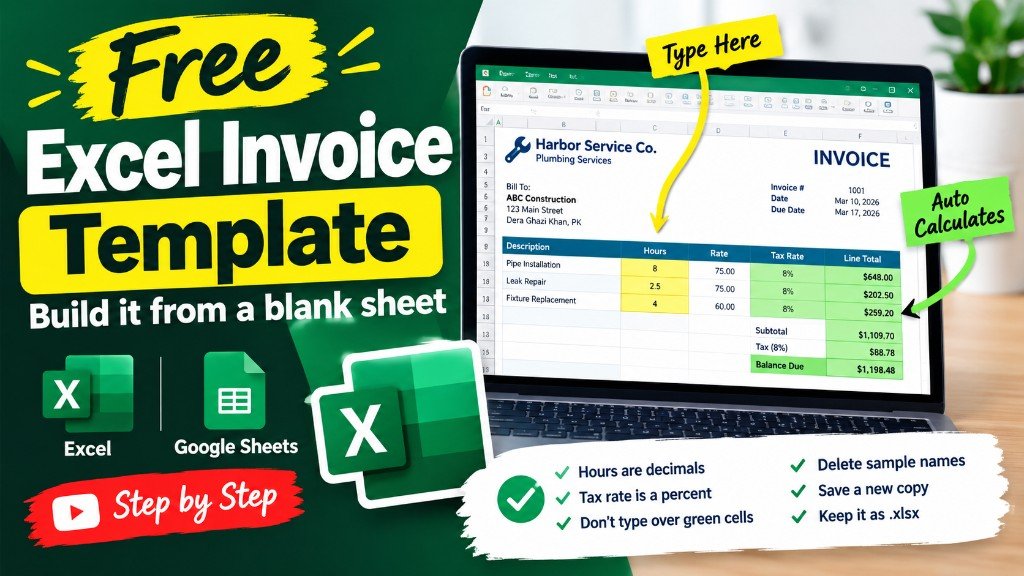
Learn the invoice before you type a single number. One short lesson on Harbor Service Co. shows the yellow cells you fill and the green formulas that add tax, the line total, and the balance. After that, your own client takes a minute.
Learn the free invoice template
The sample is Harbor Service Co., a plumber, four jobs from one week in March 2026. Wipe those rows when the totals make sense. The workbook is free. Open it in Excel, or upload the same file to Google Sheets. You do not need a billing app for a clear invoice.
Download the invoice template
Download the Excel file. If you work in Google Sheets, upload that same workbook to Drive and open it there. Leave the green cells alone.
I leave the sample rows in until I have typed one real line next to them. That way I can see whether my hours or prices sit in the same neighborhood as the example. Then I delete the leftover names. If you share the file, strip the sample clients first.
After you wipe the sample, save a clean copy under a name that includes the month or the client. I have lost a week of hours by typing over last week’s file. The formulas do not care about the file name. You will.
What to type in each column
Invoice number is yours to choose. INV-1041 is only a sample. Use a number you will not repeat, so you and the client can find the bill later. The sheet does not invent this number.
Date is the day you send the bill. Type a real date. Do not type the word Tuesday. Excel and Google Sheets can sort a real date. The sample week is March 2026.
Client is the person or company that should pay. Use the name they expect to see on the bill. Harbor Street Apartments is a client. Lena Ortiz is a client. Keep one client on each row.
Description is the work in plain words. One visit or one task belongs on one row. Replace a kitchen shutoff valve is enough. Do not hide the price inside this sentence. The price has its own columns.
Hours is how long the work took. Use decimals. Thirty minutes is 0.5, not 30. If you type 30, the bill will look like thirty hours and the total will be nonsense. Half an hour of a $95 rate is $47.50 before tax, not $2,850.
Rate is what you charge for one hour, in dollars, or your own currency. Type the number only. The currency note at the top of the sheet tells the reader which money you mean. The sample uses $95 and, for one after-hours job, $110.
Tax rate is a percent. Type 8% if the tax is 8 percent. The cell stores that as 0.08 and shows 8%. Do not type the number 8 by itself if you mean 8 percent, or the tax will be eight times the whole bill. If you do not charge tax, type 0%.
Tax is green. The sheet multiplies hours by rate by the tax rate, then rounds to the cent. You do not type it. For 2.5 hours at $95 and 8 percent, the tax is $19.00.
Line total is green. It is hours times rate, plus tax. That is the amount of that invoice. For the first sample row it is $256.50.
Amount paid is what has already arrived. Type 0 if the client has not paid. Type the full line total if the bill is settled. A partial payment, such as the $100 on the cafe invoice, is allowed.
Balance is green. It is the line total minus the amount paid. This is what is still owed. A paid invoice shows $0.00. An unpaid invoice shows the full line total.
Example: four invoices for a plumber
Harbor Service Co. is a one-person plumbing business. In the first week of March 2026 the owner sent four invoices. Each row is one bill. The tax rate on every row is 8 percent. Amounts are in dollars, or your own currency if you change the header note and type your own rate.
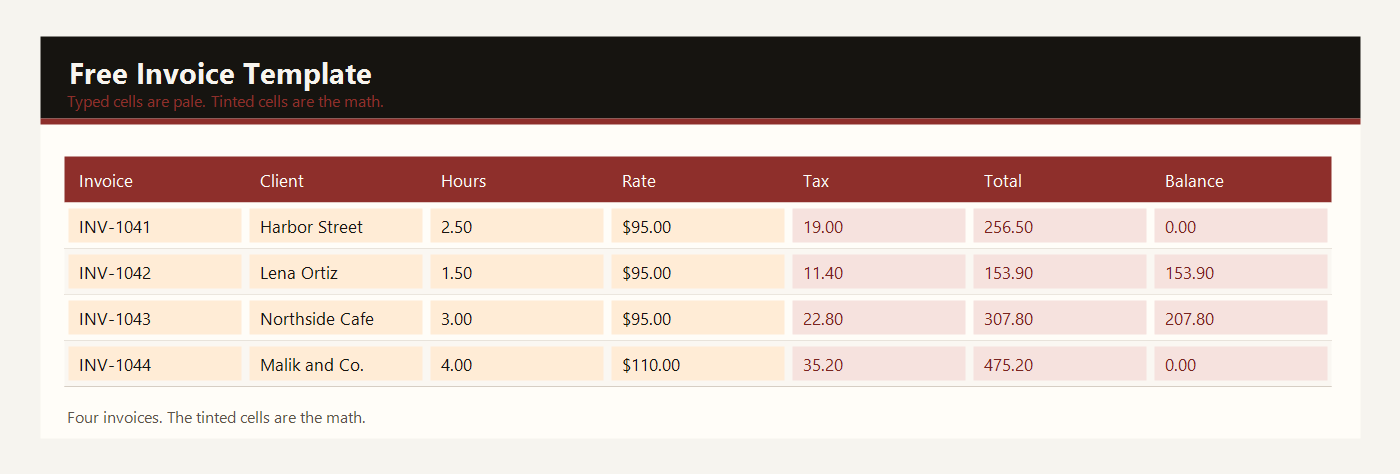
| Invoice | Client | Hours | Rate | Tax | Line total | Paid | Balance |
|---|
| INV-1041 | Harbor Street Apartments | 2.5 | $95.00 | $19.00 | $256.50 | $256.50 | $0.00 |
| INV-1042 | Lena Ortiz | 1.5 | $95.00 | $11.40 | $153.90 | $0.00 | $153.90 |
| INV-1043 | Northside Cafe | 3 | $95.00 | $22.80 | $307.80 | $100.00 | $207.80 |
| INV-1044 | Malik and Co. Office | 4 | $110.00 | $35.20 | $475.20 | $475.20 | $0.00 |
INV-1041 is a kitchen shutoff valve at Harbor Street Apartments. The job took 2.5 hours at $95. The sheet multiplies 2.5 by 95 to get $237.50, then adds 8 percent tax, which is $19.00. The line total is $256.50. The building paid the full amount, so the balance is $0.00.
INV-1042 is a main drain for Lena Ortiz. It took 1.5 hours at the same $95 rate. The line before tax is $142.50. Tax is $11.40. The line total is $153.90. Nothing has been paid, so the balance stays $153.90.
INV-1043 is a prep-sink faucet at Northside Cafe. Three hours at $95 is $285.00 before tax. Tax is $22.80, so the line total is $307.80. The cafe paid $100.00 toward the bill. The balance is $207.80.
INV-1044 is a water-heater union at Malik and Co. Office. This job is priced at $110 an hour because it was after the normal visit. Four hours is $440.00 before tax. Tax is $35.20. The line total is $475.20, and it was paid in full, so the balance is $0.00.
The total row adds the column. Hours are 11. Line totals are $1,193.40. Amount paid is $831.70. The open balance is $361.70. That last number is what clients still owe. If you change a yellow cell, these green totals move. That is the point of the sheet.
Excel and Google Sheets
Download invoice-template-excel.xlsx and open it in Excel, or drop that same file into Google Drive and open it with Google Sheets. I do not keep a second copy for Sheets. One workbook is enough.
On this invoice the green tax cell is hours times rate times tax rate. The line total adds that tax. The balance subtracts what has been paid. Upload invoice-template-excel.xlsx to Drive if you live in Google Sheets. The four sample rows can stay until you understand the totals, then replace them with your own jobs.
The math uses IF, ROUND, SUM, SUMIF, and COUNTIF. Leave the file as xlsx. A CSV export keeps the numbers and throws the formulas away. Input cells are yellow. Results are green. Type over a green cell and the formula is gone — Undo, or grab the file again.
The sample money is in dollars. If you work in another currency, change the note at the top of the sheet. Adding 2.5 × 95 does not care what you call the unit.
Common invoice mistakes
- Typing 30 in Hours when you mean half an hour. Use 0.5.
- Typing 8 in the tax rate when you mean 8%. Use the percent format.
- Typing a number into the green Tax, Line total, or Balance cells. Those cells already have formulas.
- Leaving the sample clients in the file and sending it to a real customer.
- Forgetting to change the currency note when you do not use dollars.
Related templates
If the job in front of you is a little different, these two are usually the next stop.