Free Excel template
Free Excel Purchase Order Template
This free purchase order generator Excel workbook is the order you send a supplier before the goods arrive. Download the free Excel purchase order template, type the supplier, the item, the quantity, and the unit price, and the sheet calculates each line and the order total. The same file opens in Excel and in Google Sheets. There is no email form in front of the download.
The sample order is PO-220 from Harbor Goods to BrightPaper Supply on March 5, 2026. Prices are in dollars, or your own currency. A purchase order is the order you are placing. The bill you send a customer after the work lives on the invoice template.
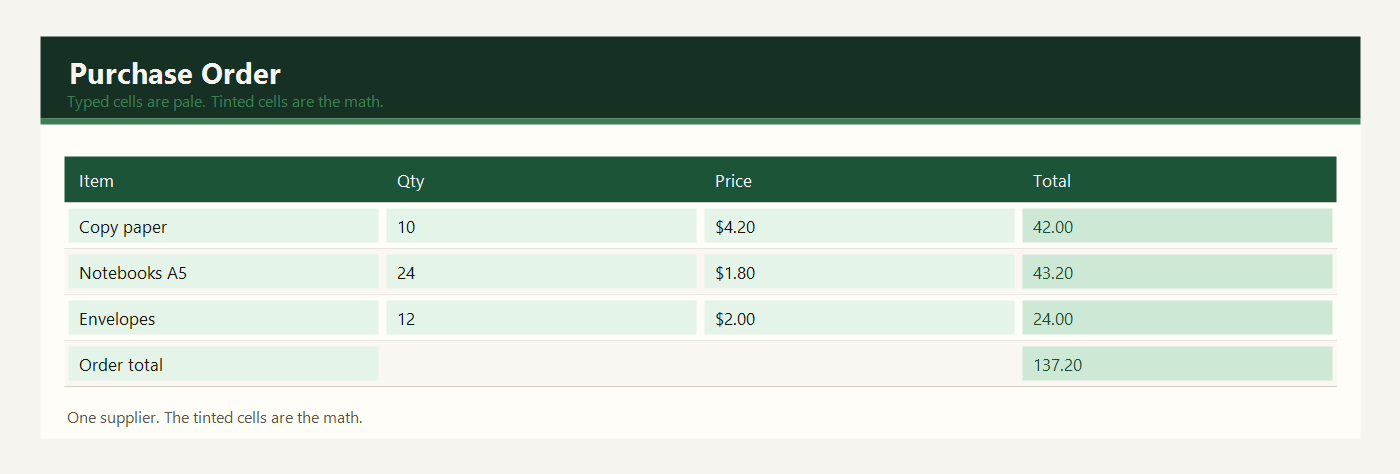
Free purchase order generator Excel
The free purchase order generator Excel file is one workbook named purchase-order-template-excel.xlsx. Download the purchase order generator Excel sheet. Type only in the pale cells. Green cells are the line totals and the order total. Quantity times unit price is the generator. You do not type a line total by hand.
Download Excel. Use that same file when you want a Google Sheets copy. Keep one order in each copy of the file.
- Download purchase-order-template-excel.xlsx.
- Replace the supplier, the PO number, and the date.
- Type one item per row, with a quantity and a unit price.
- Read the green order total.
- Send that total to the supplier and keep the file.
Free Excel purchase order template
If you searched for a free Excel purchase order template, this is that workbook. One sheet holds one order. Copy the file when you send the next order so PO-220 is not reused. Excel for Windows, Excel for Mac, and Excel for Microsoft 365 open the same .xlsx. You do not need a separate Mac download.
Save the free purchase order template on your computer, then type over the Harbor Goods sample. If a green total gets overwritten, undo, or download the workbook again. Leave the file as .xlsx while you still want the math. A CSV keeps the amounts you typed and drops the formulas.
Purchase order format Excel free download
The purchase order format Excel free download is a layout a supplier can read without a login. The header has the supplier, the PO number, and the date. Under that, each row is one item: quantity, unit price, and line total. The order total sits under the lines. That is the purchase order format.
Download the free purchase order template and replace the sample names. Send the supplier the totals. Keep the formulas in your own file so the next price change still calculates. The invoice, quote, and purchase order templates are separate files so a customer bill never sits on this order.
What to type in each column
Supplier is the business you are buying from. BrightPaper Supply is the sample. Use the name they use on their own invoices so the order matches when the goods arrive.
PO number is your number for this order. PO-220 is a sample. The next order should use a new number. The sheet does not create the number.
Date is the day you send the order, not the day you hope the box arrives. March 5, 2026 is the sample.
Item is one product per row. Copy paper ream and notebooks A5 are separate rows even when they come in the same box. The supplier needs a quantity for each.
Qty is how many units you want. Type 10 for ten reams, not the word ten. A blank quantity leaves the line total blank, which is safer than a zero you did not mean.
Unit price is the supplier’s price for one unit, in dollars, or your own currency. This is cost, not the price you will later put on your own shelf.
Line total is green. It is quantity times unit price, rounded to the cent. Ten reams at $4.20 is $42.00. You do not type that product of the two pale cells.
Order total is green. It adds the line totals. That is the number you agree with the supplier before anyone ships a box.
Example: an order to one supplier
Harbor Goods sent one order to one supplier. Five lines. Tax is not calculated on this sample, because this shop’s supplier bills tax separately. If your supplier includes tax in the unit price, type the price they quoted.
| Item | Qty | Unit price | Line total |
|---|---|---|---|
| Copy paper ream | 10 | $4.20 | $42.00 |
| Notebooks A5 | 24 | $1.80 | $43.20 |
| Envelopes box | 12 | $2.00 | $24.00 |
| Ballpoint pens | 36 | $0.40 | $14.40 |
| Packing tape | 8 | $1.70 | $13.60 |
Copy paper is 10 times $4.20 = $42.00. Notebooks are 24 times $1.80 = $43.20. Envelopes are 12 times $2.00 = $24.00. Pens are 36 times $0.40 = $14.40. Packing tape is 8 times $1.70 = $13.60. The order total is $137.20.
If the supplier says notebooks are $2.00 now, change the unit price from $1.80 to $2.00. The line becomes $48.00 and the order total rises by $4.80. You do not rebuild the addition.
Send the order after the green total matches the supplier’s quote. Keep the PO number in the email subject so the delivery can be matched later. When the box arrives, count the units against the quantity column before you put them on the shelf. If the supplier adds a delivery fee, add one more row for that fee with a quantity of 1. The order total will include it.
Use the purchase order generator in Google Sheets
For Google Sheets, upload purchase-order-template-excel.xlsx to Google Drive, right-click it, and choose Open with Google Sheets. Drive may offer to convert it. Conversion is fine. You do not download a second purchase order. The line-total and order-total formulas survive the upload.
Share that Sheets file if a colleague needs the same order. Two private Excel copies become two order totals. Type only in the pale cells. Send the supplier the totals, and keep the formulas in the file you control.
Common purchase order mistakes
- Using the retail shelf price instead of the supplier’s unit cost.
- Putting two products on one row so the quantity is unclear.
- Typing the order total by hand and leaving a stale number when a price changes.
- Reusing PO-220 on the next order.
- Sending this order to a customer as a bill. A customer bill is the invoice sheet.
- Saving the workbook as CSV and wondering why the totals stopped moving.
After the goods arrive, stock that is still on the shelf belongs on the free Excel inventory template. When the cost hits the month, record it on the expense report template. This page stays the order you sent.
Workbooks for a small shop, a freelancer, or a contractor. Sample amounts are in dollars.