Workbook
Free Profit and Loss Template for Excel
A profit and loss template excel, at least this one, is a month on one page. You name each income line and each cost, then type the amounts. Income adds up. Expenses add up. Profit is the difference. Nothing here files a return.
Bright Mop Cleaning is the March 2026 sample — home cleans, a few deep cleans, wages, fuel, a phone bill. Use dollars or whatever you actually take to the bank. Keep one month in the file so April does not inherit March.
Download the profit and loss template
Download the Excel file. If you work in Google Sheets, upload that same workbook to Drive and open it there. Leave the green cells alone.
I leave the sample rows in until I have typed one real line next to them. That way I can see whether my hours or prices sit in the same neighborhood as the example. Then I delete the leftover names. If you share the file, strip the sample clients first.
After you wipe the sample, save a clean copy under a name that includes the month or the client. I have lost a week of hours by typing over last week’s file. The formulas do not care about the file name. You will.
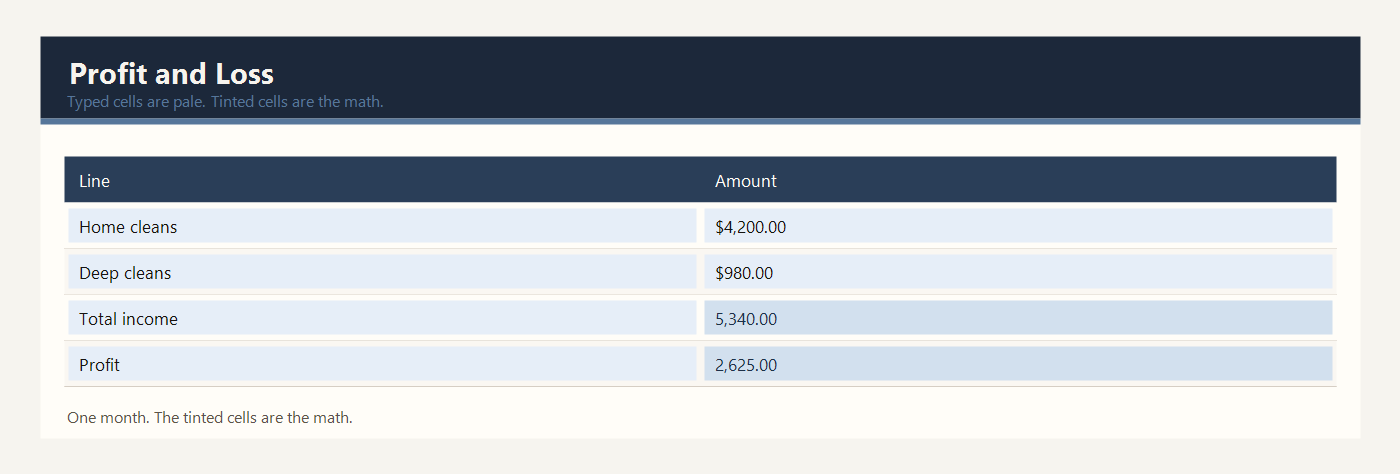
What to type in each column
The sheet has two columns that matter: Line and Amount. Line is the name of the money. Amount is the number, in dollars, or your own currency.
Income lines are the money customers paid or owe you for the month. In the sample those lines are recurring home cleans, one-time deep cleans, and supplies you billed to clients. Type your own labels over the yellow names if your work is different. Keep the total-income row where it is.
The amount next to an income line is yellow. Type the month’s total for that line, not a single visit unless that visit was the whole line. Recurring home cleans in the sample are $4,200 for the month, not $4,200 per house.
Total income is green. It adds the yellow income amounts. Do not type it. If you add another income row, you must also extend the SUM so the new row is included. The sample SUM covers the three income rows that ship with the file.
Expense lines are the costs of doing the work: wages, supplies, fuel, insurance, and the phone. Type the month’s cost in the yellow amount cell. A yearly insurance bill should be the part that belongs to this month, or the sheet will make the month look worse than it was.
Total expenses is green. It adds the yellow expense amounts. Profit is green. It is total income minus total expenses. In a good month this number is positive. If expenses are higher, profit is negative, and that is still a true result. Do not type over it to make the month look better.
Example: one month for a cleaning business
Bright Mop Cleaning had a plain March. The owner typed five kinds of cost and three kinds of income. No other software was required.
| Line | Amount |
|---|---|
| Recurring home cleans | $4,200.00 |
| One-time deep cleans | $980.00 |
| Supplies billed to clients | $160.00 |
| Total income | $5,340.00 |
| Cleaner wages | $2,100.00 |
| Cleaning supplies | $240.00 |
| Fuel | $180.00 |
| Insurance | $150.00 |
| Phone | $45.00 |
| Total expenses | $2,715.00 |
| Profit | $2,625.00 |
Total income is $4,200 plus $980 plus $160, which is $5,340.00. Total expenses are $2,100 plus $240 plus $180 plus $150 plus $45, which is $2,715.00. Profit is $5,340.00 minus $2,715.00, which is $2,625.00.
Wages are the large cost. Fuel and the phone are small. The sheet does not decide which cost is reasonable. It only shows the month you typed. If the owner adds a van repair of $600, profit falls by $600 because the expense total rises and the income total does not. That is the whole trick.
Use one file for one month. If you copy March forward to April, clear the yellow amounts first or April will still show March. Leave the green total rows in place. A month with no sales is still a month: type zero income rather than deleting the income block, so the profit line still has a formula to subtract from.
Wages in this sample are the pay you already handed over, not the pay you plan to hand over next week. Fuel is what left the bank or the cash box. If you mix a plan with a result, the profit number answers a question you did not ask.
Excel and Google Sheets
Download profit-and-loss-template-excel.xlsx and open it in Excel, or drop that same file into Google Drive and open it with Google Sheets. I do not keep a second copy for Sheets. One workbook is enough.
Profit is the green total-income cell minus the green total-expenses cell. The file is profit-and-loss-template-excel.xlsx. In Google Sheets, do not paste values on top of the profit cell. Type a new income or expense amount and let the profit move.
The math uses IF, ROUND, SUM, SUMIF, and COUNTIF. Leave the file as xlsx. A CSV export keeps the numbers and throws the formulas away. Input cells are yellow. Results are green. Type over a green cell and the formula is gone — Undo, or grab the file again.
The sample money is in dollars. If you work in another currency, change the note at the top of the sheet. Adding 2.5 × 95 does not care what you call the unit.
Common profit and loss mistakes
- Putting a whole year of insurance into one month and then treating that month as a failure.
- Typing the profit you want instead of letting income minus expenses produce it.
- Mixing money the client paid you into an expense line. Income and expenses are separate blocks.
- Forgetting a cash cost, such as fuel paid from a pocket, because there was no formal bill.
- Using this month statement as a substitute for an accountant at tax time.
Related templates
If the job in front of you is a little different, these two are usually the next stop.
Workbooks for a small shop, a freelancer, or a contractor. Sample amounts are in dollars.