Workbook
Free Employee Schedule Template for Excel
This employee schedule template excel is next week on one grid. Names down the side, days across. You type hours, not clock times — 8 for a full day, 0 for a day off. Each person gets a week total. The shop gets one too.
Harbor Goods, week of March 2, 2026, four people. Pay is not on this sheet. Planned hours and hours someone actually worked are allowed to disagree. Write 0 for a day off so a blank cell does not look like a forgotten shift.
Download the employee schedule
Download the Excel file. If you work in Google Sheets, upload that same workbook to Drive and open it there. Leave the green cells alone.
I leave the sample rows in until I have typed one real line next to them. That way I can see whether my hours or prices sit in the same neighborhood as the example. Then I delete the leftover names. If you share the file, strip the sample clients first.
After you wipe the sample, save a clean copy under a name that includes the month or the client. I have lost a week of hours by typing over last week’s file. The formulas do not care about the file name. You will.
What to type in each column
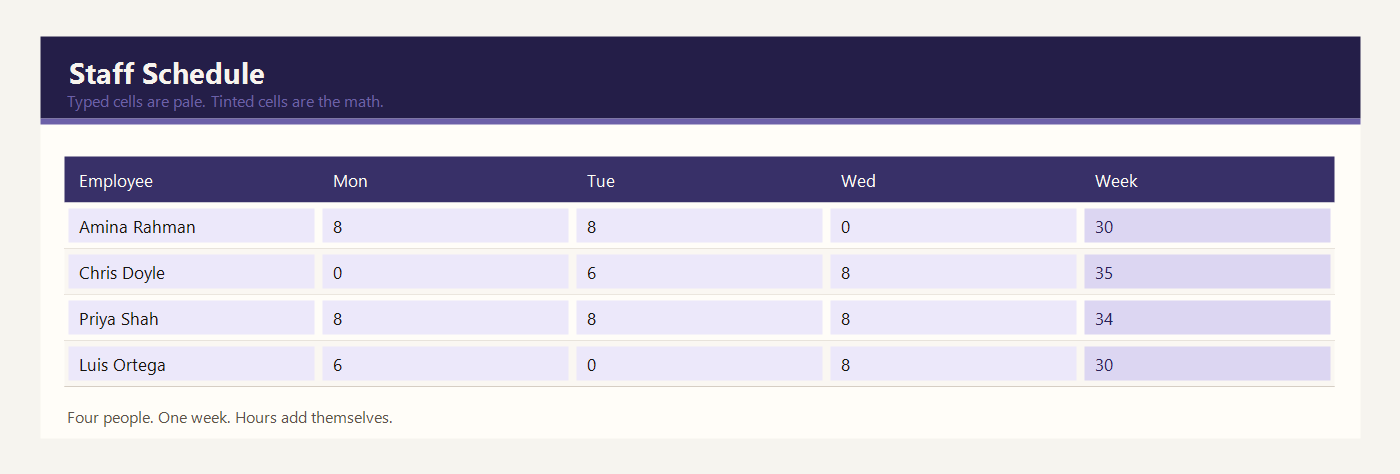
Employee is the name on the rota. Amina Rahman, Chris Doyle, Priya Shah, and Luis Ortega are the sample team. One row per person.
Mon through Sun are yellow hour cells. Type the hours you want that person to work, not a clock time. 8 means eight hours. 6 means a shorter day. 0 means they are not scheduled. If you need start and end times, keep them in a note outside these cells. This sheet adds hours.
Week hours is green. It adds Monday through Sunday for that row. Amina’s row is 8 + 8 + 0 + 8 + 6 + 0 + 0 = 30. Chris works 35. Priya works 34. Luis works 30.
The all-staff row is green. It adds each day down the column, and it adds the week-hour column. The shop total in the sample is 129 hours. If you change one yellow day, that person’s week and the shop total both move.
A zero is a real schedule choice. Do not leave a day blank if you mean zero, or a later reader cannot tell a day off from a forgotten cell. The SUM still treats a blank as zero, but a typed 0 is clearer.
Example: four staff, one week
Harbor Goods posted one week. Nobody works every day. The green column is the only total you should read.
| Employee | Mon | Tue | Wed | Thu | Fri | Sat | Sun | Week |
|---|---|---|---|---|---|---|---|---|
| Amina Rahman | 8 | 8 | 0 | 8 | 6 | 0 | 0 | 30 |
| Chris Doyle | 0 | 6 | 8 | 8 | 8 | 5 | 0 | 35 |
| Priya Shah | 8 | 8 | 8 | 0 | 0 | 6 | 4 | 34 |
| Luis Ortega | 6 | 0 | 8 | 8 | 8 | 0 | 0 | 30 |
Amina is off Wednesday, Saturday, and Sunday. Chris opens the middle of the week and works a short Saturday. Priya covers Monday through Wednesday, plus Saturday and a four-hour Sunday. Luis works Monday and Wednesday through Friday. The four week totals are 30, 35, 34, and 30. Together the shop scheduled 129 hours.
If Sunday becomes a day off for Priya, change the yellow 4 to 0. Her week falls from 34 to 30, and the shop total falls from 129 to 125. The other three people do not change.
Post the week before it starts. A rota that changes on Wednesday should be edited on Wednesday, not reconstructed from memory on Sunday. Type 0 for a day off so a blank cell is not mistaken for a forgotten shift.
Hours on this sheet are planned hours. The timesheet is where you record what happened. If Amina was scheduled for 8 and worked 6, the schedule can stay as the plan and the timesheet should show 6. Do not silently change history on both files or you will lose the difference.
The shop total of 129 hours is a planning number. It is not a wage bill. Pay is calculated only after you decide which hours are real and which rate applies. If you add a fifth person, extend the green all-staff formulas so the new row is included. A person who is missing from the total is easy to forget on a busy Saturday. Write the week starting date in the header so last week and this week are not mixed up in the same file. If two people swap a Saturday, change both yellow cells in the same edit so the shop total still matches the team you expect.
Excel and Google Sheets
Download employee-schedule-template-excel.xlsx and open it in Excel, or drop that same file into Google Drive and open it with Google Sheets. I do not keep a second copy for Sheets. One workbook is enough.
Week hours adds seven day cells. The staff total adds the four people. The file is employee-schedule-template-excel.xlsx. Google Sheets keeps those SUM formulas after you upload the workbook. This rota does not turn hours into pay.
The math uses IF, ROUND, SUM, SUMIF, and COUNTIF. Leave the file as xlsx. A CSV export keeps the numbers and throws the formulas away. Input cells are yellow. Results are green. Type over a green cell and the formula is gone — Undo, or grab the file again.
The sample money is in dollars. If you work in another currency, change the note at the top of the sheet. Adding 2.5 × 95 does not care what you call the unit.
Common schedule mistakes
- Typing 9-5 into an hours cell. The sheet needs a number of hours, such as 8.
- Leaving a day blank when the person is off. Type 0.
- Adding a fifth person under the list and forgetting to extend the all-staff SUM.
- Using the week total as net pay. Deductions are not on this sheet.
- Scheduling two shifts in one cell. Split the hours or keep the second shift in a note.
Related templates
If the job in front of you is a little different, these two are usually the next stop.
Workbooks for a small shop, a freelancer, or a contractor. Sample amounts are in dollars.