Workbook
Free Excel Task Tracker
I use this excel task tracker when a client job has more than a handful of moving pieces. Task, owner, due date, status. The sheet counts Done, In progress, and Not started. It does not bill anyone and it does not care about hours.
Northside Cafe’s spring menu is the sample: ten tasks, four already done. Spell the status words the same way every time or the count skips the row. No money on this page — just the work. Open the list in the meeting, not after it, or Friday’s Done work still says Not started.
Download the task tracker
Download the Excel file. If you work in Google Sheets, upload that same workbook to Drive and open it there. Leave the green cells alone.
I leave the sample rows in until I have typed one real line next to them. That way I can see whether my hours or prices sit in the same neighborhood as the example. Then I delete the leftover names. If you share the file, strip the sample clients first.
After you wipe the sample, save a clean copy under a name that includes the month or the client. I have lost a week of hours by typing over last week’s file. The formulas do not care about the file name. You will.
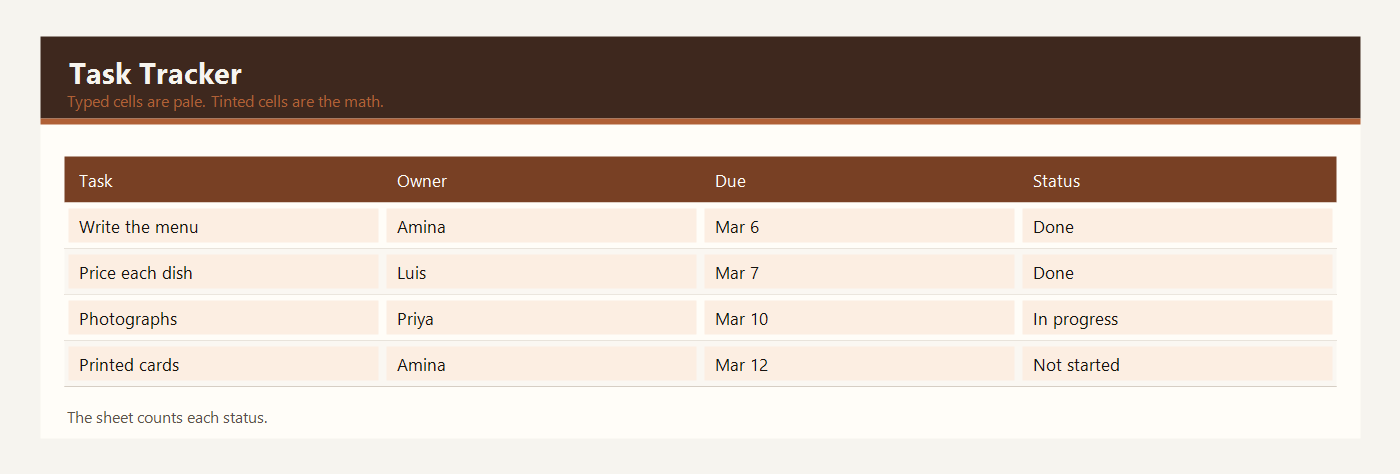
What to type in each column
Task is the job in a few words. Write the new menu is a task. Photograph three plates is a task. If the sentence needs a paragraph, the note column is the place for it, not the task name.
Owner is one person. Amina, Luis, Priya, or Chris in the sample. If two people share a task, pick the person who will say it is done. A blank owner is how work gets lost.
Due date is the day the task should be finished, not the day you typed it. Use a real date. March 6, 2026 is the due date for the menu draft in the sample. The sheet does not email anyone when a date passes. You still have to look.
Status is a yellow cell with three words the count understands: Done, In progress, or Not started. Spell them the same way every time, including the space in In progress. If you type Finished or Complete, the Done count will ignore the row.
Priority is High, Medium, or Low. The sheet does not sort itself from this word. It is a label so the team can see what matters this week. High on a menu price is not the same as Low on an email to regulars.
Note is optional detail: 40 cards is enough, or use daylight by the front window. Notes do not change the counts.
The three count cells are green. Done uses COUNTIF on the status column for the word Done. In progress and Not started work the same way. With ten sample tasks, the counts are 4 done, 2 in progress, and 4 not started. Those three numbers add up to 10. If they do not, a status is spelled wrong.
Example: a 10-task client job
Northside Cafe asked a small team to launch a spring menu. The list has ten tasks. Status is typed. The counts at the bottom are formulas.
| Task | Owner | Due | Status | Priority |
|---|---|---|---|---|
| Write the new menu | Amina | 2026-03-06 | Done | High |
| Price each dish | Luis | 2026-03-07 | Done | High |
| Photograph three plates | Priya | 2026-03-10 | In progress | Medium |
| Update the window board | Chris | 2026-03-11 | Not started | Medium |
| Order printed menu cards | Amina | 2026-03-12 | Not started | High |
| Brief the Saturday staff | Luis | 2026-03-13 | Not started | High |
| Order the new ingredients | Priya | 2026-03-09 | Done | High |
| Test the dessert recipe | Chris | 2026-03-08 | Done | Medium |
| Email regulars about launch night | Amina | 2026-03-14 | Not started | Low |
| Review the launch-night rota | Luis | 2026-03-13 | In progress | Medium |
Four tasks are Done: the menu draft, the prices, the ingredient order, and the dessert test. Two are In progress: the photographs and the launch-night rota. Four are Not started: the window board, the printed cards, the Saturday briefing, and the email to regulars. 4 + 2 + 4 = 10.
The printed cards are High and Not started, with a due date of March 12. That is the row a manager should look at first. The email to regulars is Low, so it can wait until the cards are ordered. The sheet does not make that judgment. The priority word and the status word sit next to each other so you can.
If Priya marks the photographs Done, the Done count becomes 5 and In progress becomes 1. You change one yellow status. You do not edit the count.
Open this list in the meeting, not after it. Change the status while the owner is in the room. A list that is updated on Friday and ignored until the next Friday will show work as Not started when it is already Done. The counts are only as honest as the last person who typed a status.
Excel and Google Sheets
Download excel-task-tracker.xlsx and open it in Excel, or drop that same file into Google Drive and open it with Google Sheets. I do not keep a second copy for Sheets. One workbook is enough.
The counts only recognize three status phrases. The file is excel-task-tracker.xlsx. In Google Sheets the COUNTIF formulas work the same way after you upload the file. Do not rename Done to Completed unless you also change the formula.
The math uses IF, ROUND, SUM, SUMIF, and COUNTIF. Leave the file as xlsx. A CSV export keeps the numbers and throws the formulas away. Input cells are yellow. Results are green. Type over a green cell and the formula is gone — Undo, or grab the file again.
The sample money is in dollars. If you work in another currency, change the note at the top of the sheet. Adding 2.5 × 95 does not care what you call the unit.
Common task tracker mistakes
- Typing Complete instead of Done and then trusting a count that skipped the row.
- Putting two names in the owner cell and assuming both people know.
- Using the due date column for the day the task was created.
- Adding an eleventh task below the list and forgetting that the count range covers the original ten rows. Extend the COUNTIF range if you add rows.
- Tracking pay or hours here. This sheet does not calculate money.
Related templates
If the job in front of you is a little different, these two are usually the next stop.
Workbooks for a small shop, a freelancer, or a contractor. Sample amounts are in dollars.