Free Excel template
Free Marketing Plan Template
This marketing plan template is where a shop writes its marketing strategy. You type the customer, the offer, the strategic plans, and what you will spend. The sheet calculates the difference between the plan and the result. Excel and Google Sheets open the same file. There is no email form in front of the download.
A strategy in business can be this short. The sample is a company strategy example for Harbor Goods in April 2026. Amounts are in dollars, or your own currency. Keep one period in each copy of the file.
Marketing strategy
The marketing strategy sits in three pale cells: customer, offer, and promise. Harbor Goods sells to neighborhood shoppers, offers same-week local delivery, and promises that an order placed by noon goes out this week. That choice is the strategic strategy. If you cannot point at those three cells, the rest of the sheet is a list of chores.
Download the marketing plan template. The file is marketing-plan-template-excel.xlsx. Pale cells are yours. Green cells are the differences and the channel total.
- Download the workbook.
- Replace the customer, the offer, and the promise.
- Type a target and an actual for each plan.
- Type a budget and an amount spent for each channel.
- Read the green differences before you add another tactic.
Strategic plans
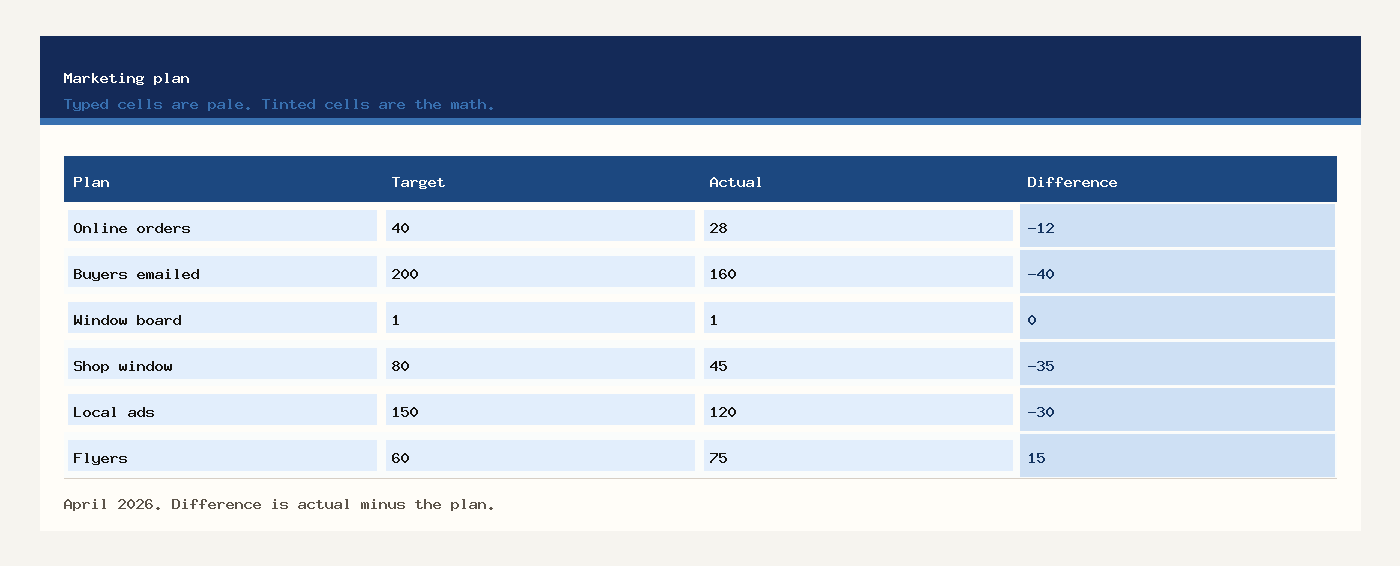
Strategic plans are the numbers you said you would hit. Each row has a target, an actual, and a difference. Difference is actual minus target. A negative number means you are short of the plan. You do not type the difference.
| Plan | Target | Actual | Difference |
|---|---|---|---|
| New online orders | 40 | 28 | -12 |
| Past buyers emailed | 200 | 160 | -40 |
| Window board updated | 1 | 1 | 0 |
New online orders were planned at 40 and finished at 28, so the row is 12 short. Past buyers emailed were planned at 200 and finished at 160, so that row is 40 short. The window board was planned once and done once, so that difference is 0.
Marketing and planning
Marketing and planning on this sheet is the channel block. Strategic marketing strategies here are three rows: the shop window, local ads, and flyers. Marketing strategies in marketing are often described with longer names. On this workbook each one still needs a budget and an amount spent.
| Channel | Budget | Spent | Difference |
|---|---|---|---|
| Shop window | $80.00 | $45.00 | $-35.00 |
| Local ads | $150.00 | $120.00 | $-30.00 |
| Flyers | $60.00 | $75.00 | $15.00 |
| Channel total | $290.00 | $240.00 | $-50.00 |
The window was planned at $80.00 and cost $45.00. Local ads were planned at $150.00 and cost $120.00. Flyers were planned at $60.00 and cost $75.00, which is $15.00 over that row. The channel total is $240.00 spent against $290.00 planned, so the period is $50.00 under the channel budget. A positive difference on a channel means you spent more than that row’s budget.
Company strategy example
This company strategy example is one shop, not a group of companies. A corporate plan and a corporate level strategy describe the same kind of choice for a larger firm: who you serve, and what you will spend to reach them. Corporate strategic language can stay off this sheet. Firm level strategy, for Harbor Goods, is the delivery promise. Operation strategy is the channel list that makes the promise visible.
Business diversification strategy, in this sample, is the online-order row next to walk-in shoppers. A second offer is optional. If you do not want one, delete that plan row and extend nothing else. The quote template is where a priced offer goes once a customer asks for a number. Names and next steps belong on the CRM template.
Planning and strategic planning
Planning and strategic planning on this file is the order of the blocks. Write the marketing strategy first. Then set strategic plans. Then put money on channels. Then name the person who will do each action. Skipping to flyers before the customer cell is filled leaves you with a cost and no offer.
Project management strategy on this page is the action list: refresh the window board, email past buyers, print 40 flyers. Each row has an owner, a date, and a status. Amina, Luis, and Priya are the sample. When the list grows past a handful of rows, move it to the task tracker. This sheet keeps only the actions that serve the plans above.
Open the workbook in Excel for Windows, Excel for Mac, or Excel for Microsoft 365. Download Excel. For Google Sheets, upload marketing-plan-template-excel.xlsx to Drive and open it with Google Sheets. Subtraction and SUM survive the upload. Share one file if two people edit the period.
Strategic planning strategies
Strategic planning strategies that do not fit a row do not belong on this sheet. Use these checks before you add another line.
- Leaving customer, offer, or promise blank and still buying ads.
- Typing the actual into the target column at the end of the month. The target is the number you set first.
- Reading a positive channel difference as spare money. On a spend row it means you went over that budget.
- Adding a channel under the total and expecting the SUM to notice. Insert the row inside the block.
- Treating a corporate plan as something this shop must copy. Write the strategy in business you can actually run.
- Saving the workbook as CSV and losing the difference formulas.
The other sales files sit on the sales templates page. This one stays the marketing plan.
Workbooks for a small shop, a freelancer, or a contractor. Sample amounts are in dollars.