Workbook
Free Payroll Template for Excel and Google Sheets
This payroll excel template multiplies hours by a rate and subtracts a deduction you already know. The how to use a free payroll template in Excel walks through the sample week. That is all it does. It does not look up tax, and it is not a payroll service. Read the disclaimer before you treat a net-pay cell as money you must hand over.
Three hourly people at Harbor Goods, week of March 2, 2026. The sample deductions are round numbers so you can see the subtraction — they are not a tax table for any country. Match the hours to the timesheet first.
Download the payroll template
Download the Excel file. If you work in Google Sheets, upload that same workbook to Drive and open it there. Leave the green cells alone.
I leave the sample rows in until I have typed one real line next to them. That way I can see whether my hours or prices sit in the same neighborhood as the example. Then I delete the leftover names. If you share the file, strip the sample clients first.
After you wipe the sample, save a clean copy under a name that includes the month or the client. I have lost a week of hours by typing over last week’s file. The formulas do not care about the file name. You will.
What to type in each column
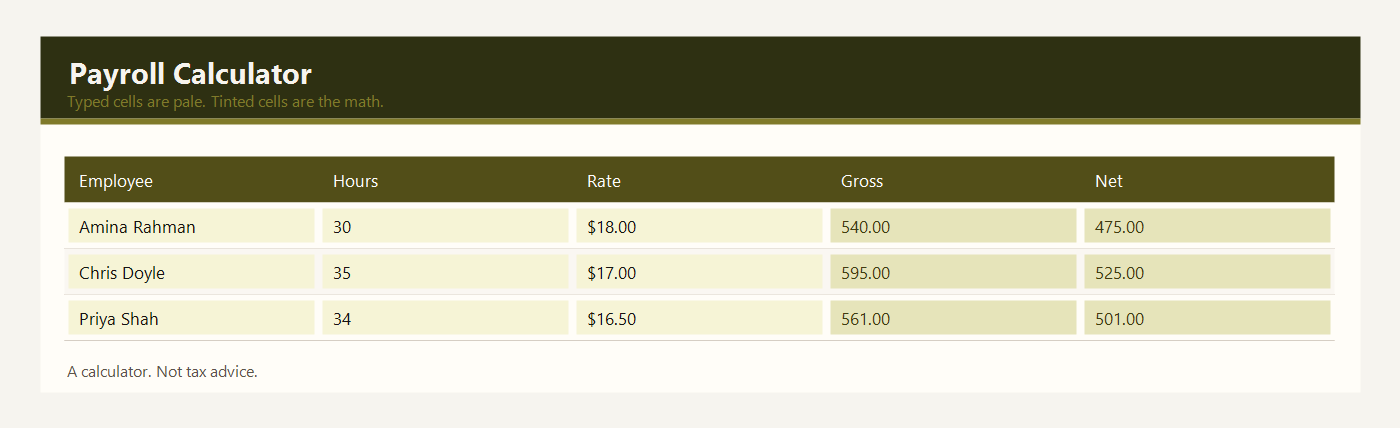
Employee is the person being paid. Amina Rahman, Chris Doyle, and Priya Shah are the sample. One row per person for this pay period.
Hours is the time you are paying. The sample uses 30, 35, and 34, which match those three people on the weekly rota. Type hours, not a clock time. If the timesheet and the rota disagree, decide which number is right before you type it here.
Rate is the hourly rate, in dollars, or your own currency. Amina is $18, Chris is $17, and Priya is $16.50 in the sample. The sheet does not know minimum wage in your country. You type the rate you owe.
Gross pay is green. It is hours times rate, rounded to the cent. Amina is 30 times $18, which is $540. Chris is 35 times $17, which is $595. Priya is 34 times $16.50, which is $561.
Deductions is a yellow number you type. It is the amount to withhold or subtract for this period, the figure your accountant, your payroll service, or your own written rule already gave you. The sample uses $65, $70, and $60 only so you can see subtraction. Those numbers are not a tax table and they are not a rate for any country.
Net pay is green. It is gross pay minus the deduction you typed. Amina’s net is $540 minus $65, which is $475. You do not type net pay.
The total row adds hours, gross pay, deductions, and net pay. In the sample, gross pay is $1,696.00, deductions are $195.00, and net pay is $1,501.00.
Example: three employees, one pay period
Three hourly employees. One week. The deduction column is typed. Gross and net are formulas. This is a worked example, not a recommendation of what to withhold.
| Employee | Hours | Rate | Gross | Deductions | Net |
|---|---|---|---|---|---|
| Amina Rahman | 30 | $18.00 | $540.00 | $65.00 | $475.00 |
| Chris Doyle | 35 | $17.00 | $595.00 | $70.00 | $525.00 |
| Priya Shah | 34 | $16.50 | $561.00 | $60.00 | $501.00 |
Hours add up to 99. Gross pay adds up to $1,696.00. Deductions add up to $195.00. Net pay adds up to $1,501.00, which is gross minus deductions. Luis Ortega is on the rota for 30 hours but is not in this pay example. Do not assume every name on a schedule is in the same pay run.
If Chris works 36 hours instead of 35, change the yellow hours cell. Gross becomes $612 and net becomes $542 if the deduction stays $70. The sheet will not change the deduction for you. That is deliberate. A calculator that invents tax would be pretending to know your country.
This payroll sheet is a calculator, not tax advice. Read the disclaimer before you treat a net-pay cell as the amount you must pay.
Match the hours to the timesheet before you type them. The sample hours for Amina, Chris, and Priya happen to match the rota. Your week may not. A person who was scheduled and did not work should not be paid for the scheduled hours.
Write the deduction down from a source you can name: a payroll notice, an accountant, or a written rule you already use. Do not invent a percent because the sample used a round number. After you type it, read the net pay back to yourself and confirm the green gross is hours times rate. If those two sentences are true, the sheet has done its job. It has not filed anything with a tax authority.
Excel and Google Sheets
Download payroll-template-excel.xlsx and open it in Excel, or drop that same file into Google Drive and open it with Google Sheets. I do not keep a second copy for Sheets. One workbook is enough.
Gross pay multiplies hours by rate. Net pay subtracts the deduction you typed. The file is payroll-template-excel.xlsx. The formulas are ordinary multiplication and subtraction, so they survive the upload to Google Sheets. Nothing in the file looks up a tax bracket.
The math uses IF, ROUND, SUM, SUMIF, and COUNTIF. Leave the file as xlsx. A CSV export keeps the numbers and throws the formulas away. Input cells are yellow. Results are green. Type over a green cell and the formula is gone — Undo, or grab the file again.
The sample money is in dollars. If you work in another currency, change the note at the top of the sheet. Adding 2.5 × 95 does not care what you call the unit.
Common payroll mistakes
- Treating the sample deductions as the correct tax for your country. They are placeholders.
- Typing net pay into the green cell and wiping out the formula.
- Paying the gross figure when you meant to pay net.
- Copying hours from a schedule that still has a mistake.
- Using this workbook instead of a professional payroll service when the law in your country requires one.
Related templates
If the job in front of you is a little different, these two are usually the next stop.
Workbooks for a small shop, a freelancer, or a contractor. Sample amounts are in dollars.