Workbook
Free Fillable CRM Worksheet for Excel
This excel CRM template is a free fillable CRM worksheet I can open without a login. Name, last contact, next step, stage, a rough deal value. Open work is Talking or Quote sent. Those rows add up. Won and Lost stay on the list so you can see what already closed.
Harbor Service Co. has fifteen people in the sample. The open pipeline is an estimate, not cash. A next step that still says “Call Thursday” from last month means the list has gone stale.
Download the CRM template
Download the Excel file. If you work in Google Sheets, upload that same workbook to Drive and open it there. Leave the green cells alone.
I leave the sample rows in until I have typed one real line next to them. That way I can see whether my hours or prices sit in the same neighborhood as the example. Then I delete the leftover names. If you share the file, strip the sample clients first.
After you wipe the sample, save a clean copy under a name that includes the month or the client. I have lost a week of hours by typing over last week’s file. The formulas do not care about the file name. You will.
What to type in each column
Customer is the person or account. Harbor Street Apartments and Lena Ortiz are customers. Use the name you would say when you call.
Business is the type of work they do, such as cafe, clinic, or homeowner. It is a label, not a formula.
Last contact is the date you last spoke, emailed, or visited. Use a real date. March 1, 2026 is a last contact in the sample. If you only remember the month, you still need a day or the cell will not sort cleanly.
Next step is the next action in a few words. Call on Thursday. Send the price. Wait for the board. If the next step is blank, the row will sit still. The sheet does not remind you. The words are the reminder when you open the file.
Stage is one of five phrases: New, Talking, Quote sent, Won, or Lost. Spell them the same way every time. The pipeline formula looks for Talking and Quote sent. Won, Lost, and New are not added into the open money.
Deal value is your current estimate of the work, in dollars, or your own currency. A new lead with no price yet is 0. A quote you already sent uses the number on that quote. When the job is won or lost, you can leave the value so the history stays, but the open pipeline ignores those stages.
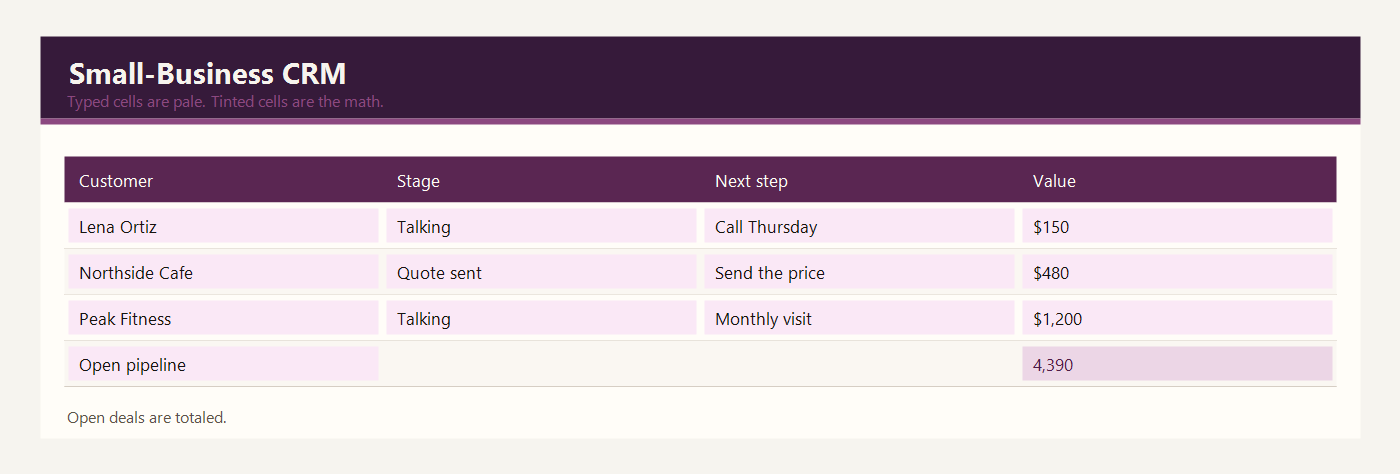
Open pipeline is green. It adds deal values where the stage is Talking or Quote sent. Open count is green. It counts those same rows. In the sample the open pipeline is $4,390.00 across 7 customers.
Example: 15 customers
Fifteen customers. Seven of them are still open: four Talking and three Quote sent. The other rows are Won, Lost, or New with no price.
| Customer | Stage | Next step | Deal value |
|---|---|---|---|
| Harbor Street Apartments | Won | Book the spring visit | $256.50 |
| Lena Ortiz | Talking | Call on Thursday | $150.00 |
| Northside Cafe | Quote sent | Send the price | $480.00 |
| Malik and Co. | Won | Month is closed | $475.20 |
| Priya Shah Design | New | Introduce the service | $0.00 |
| Oak Lane Clinic | Talking | Walk the rooms | $900.00 |
| Blue Kettle Bakery | Quote sent | Wait for a reply | $320.00 |
| Jordan Hale | Lost | No next step | $0.00 |
| Peak Fitness | Talking | Price a monthly visit | $1,200.00 |
| Little Elm PTA | Quote sent | Wait for the board | $640.00 |
| Sana Iqbal | Won | Confirm Thursday | $180.00 |
| River Hardware | New | Stop by the counter | $0.00 |
| Camille Brooks | Talking | Price three units | $700.00 |
| Metro Dental | New | Send two references | $0.00 |
| Green Parcel Co. | Lost | Close the file | $0.00 |
Talking is Lena Ortiz at $150, Oak Lane Clinic at $900, Peak Fitness at $1,200, and Camille Brooks at $700. That is $2,950. Quote sent is Northside Cafe at $480, Blue Kettle Bakery at $320, and Little Elm PTA at $640. That is $1,440. Together the open pipeline is $4,390.00.
Harbor Street Apartments is Won at $256.50, so it is not in that pipeline. Jordan Hale is Lost at $0. Priya Shah Design is New at $0, which means you have not priced the work. Change a stage from Quote sent to Won and that value leaves the open pipeline without you editing the total.
Update the last-contact date on the day you actually speak to the person. A date from last month with a next step of Call Thursday is a list that has gone stale. Sort by that date when you sit down to make calls. The open pipeline is a money estimate, not cash in the bank. Do not spend it.
Excel and Google Sheets
Download excel-crm-template.xlsx and open it in Excel, or drop that same file into Google Drive and open it with Google Sheets. I do not keep a second copy for Sheets. One workbook is enough.
The open pipeline adds two SUMIF formulas, one for Talking and one for Quote sent. The file is excel-crm-template.xlsx. Google Sheets supports SUMIF, so the upload to Drive keeps the total. If you invent a new stage name, add it to the formula or it will be invisible to the total.
The math uses IF, ROUND, SUM, SUMIF, and COUNTIF. Leave the file as xlsx. A CSV export keeps the numbers and throws the formulas away. Input cells are yellow. Results are green. Type over a green cell and the formula is gone — Undo, or grab the file again.
The sample money is in dollars. If you work in another currency, change the note at the top of the sheet. Adding 2.5 × 95 does not care what you call the unit.
Common CRM mistakes
- Typing Quoted instead of Quote sent, then missing that deal in the total.
- Leaving a next step blank and assuming you will remember.
- Putting won work in the open pipeline by leaving the stage on Talking after the client said yes.
- Using this list as a full sales system with email and calling built in. It is a sheet.
- Mixing currencies in the deal value column without saying so in the header.
Related templates
If the job in front of you is a little different, these two are usually the next stop.
Workbooks for a small shop, a freelancer, or a contractor. Sample amounts are in dollars.