Free Excel template
Free Small Business Budget Template
This free small business budget template is one month of income and expenses for a shop or a freelancer. Type what you planned and what actually happened. The sheet subtracts and shows what is left. Excel and Google Sheets open the same file. There is no email form in front of the download.
The sample is Harbor Goods for March 2026. Amounts are in dollars, or your own currency. It is a small business spreadsheet for income and expenses, not a written business plan and not a partnership agreement. Keep one month in each copy of the file.
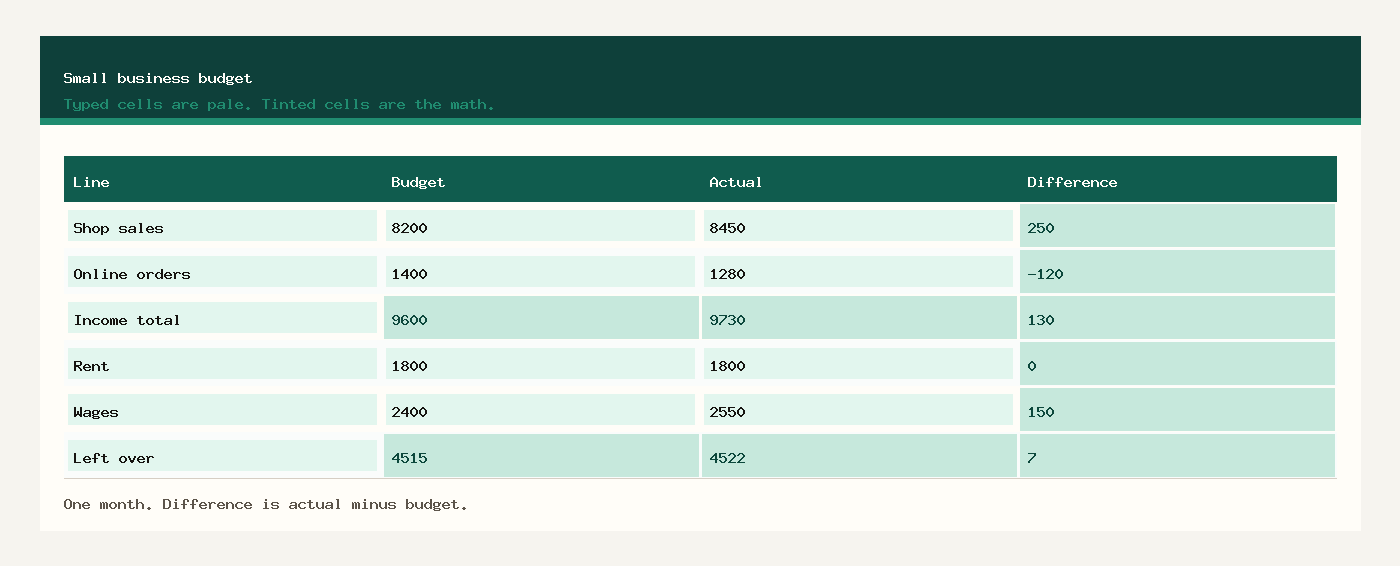
Free small business budget template
The free small business budget template is one workbook named small-business-budget-template-excel.xlsx. Download the free small business budget template. Pale cells are the budget and the actual. Green cells are the difference, the totals, and what is left.
- Download the workbook.
- Replace Harbor Goods and March 2026 with your business and your month.
- Type each income line and each expense line.
- Read the green Left over row.
- Copy the file for the next month so March stays intact.
Small business budget template Excel
The small business budget template Excel file opens in Excel for Windows, Excel for Mac, and Excel for Microsoft 365. Double-click the .xlsx. You do not need a second download for Mac. The difference is Actual minus Budget, which is ordinary subtraction, so it works in every current Excel.
Download Excel. Save the file on your computer, then type over the sample. If a green total gets overwritten, undo, or download the workbook again. Leave it as .xlsx while you still want the math. A CSV keeps the numbers you typed and drops the formulas.
Small business spreadsheet for income and expenses
If you searched for a small business spreadsheet for income and expenses, this is that layout. Income sits in its own block. Expenses sit in the next block. Each line has a budget, an actual, and a difference. The free small business spreadsheet for income and expenses is this one file, not a stack of separate workbooks.
Shop sales and online orders are the sample income lines. Rent, wages, supplies, fuel, insurance, and the phone are the sample expense lines. Add a row inside the block and extend the SUM if you need another line. The small business expense tracking Excel view is the expense block: budget, what you spent, and whether you went over.
What to type in each column
Line is the name you will still recognize in June. Shop sales and Rent are the samples. Use the same words every month.
Budget is what you planned for that line before the month started. Type the number you intended, not a hope you invent at the end of the month.
Actual is what the bank, the till, or the bills show. For income it is money in. For an expense it is money out.
Difference is green. It is Actual minus Budget. On an income line, a positive number means you took in more than the plan. On an expense line, a positive number means you spent more than the plan. You do not type it.
Income total and Expense total are green. They add the lines in that block. Left over is green. It is income minus expenses, once for the budget and once for the actual.
Example: Harbor Goods in March
Harbor Goods planned the month, then typed what happened. Difference is actual minus budget.
| Line | Budget | Actual | Difference |
|---|---|---|---|
| Income | |||
| Shop sales | $8,200.00 | $8,450.00 | $250.00 |
| Online orders | $1,400.00 | $1,280.00 | $-120.00 |
| Income total | $9,600.00 | $9,730.00 | $130.00 |
| Expenses | |||
| Rent | $1,800.00 | $1,800.00 | $0.00 |
| Wages | $2,400.00 | $2,550.00 | $150.00 |
| Supplies | $450.00 | $390.00 | $-60.00 |
| Fuel | $220.00 | $260.00 | $40.00 |
| Insurance | $150.00 | $150.00 | $0.00 |
| Phone | $65.00 | $58.00 | $-7.00 |
| Expense total | $5,085.00 | $5,208.00 | $123.00 |
| Left over | $4,515.00 | $4,522.00 | $7.00 |
Shop sales were planned at $8,200.00 and came in at $8,450.00, so that line is $250.00 over the plan. Online orders were $120.00 under the plan. Income still finishes $130.00 above the plan, at $9,730.00.
Wages were planned at $2,400.00 and landed at $2,550.00. That is $150.00 over. Supplies came in $60.00 under. Expense actual is $5,208.00, which is $123.00 over the expense plan. Left over on the actual column is $4,522.00.
When the month is closed, copy the actual income and the actual expenses onto the profit and loss template. Receipts for those costs belong on the expense report. Cash still in the bank belongs on the balance sheet. All four sit with the other bookkeeping templates.
Small business expense tracking in Google Sheets
For Google Sheets, upload small-business-budget-template-excel.xlsx to Google Drive, right-click it, and choose Open with Google Sheets. Drive may offer to convert it. Conversion is fine. You do not download a second budget. Subtraction and SUM survive the upload.
If two people update the month, share that Sheets file. Two private Excel copies become two versions of Left over. Type only in the pale cells.
Common budget mistakes
- Typing the actual into the budget column at the end of the month. The budget is the plan you made first.
- Putting a customer invoice in the expense block. Income and expenses are separate blocks.
- Reading a positive expense difference as good news. On an expense line it means you spent more than the plan.
- Adding a row under the total and wondering why the SUM ignored it. Extend the SUM, or insert the row inside the block.
- Saving the workbook as CSV and losing the difference formulas.
- Treating this month sheet as a business plan, a loan application, or a partnership agreement. Those are different documents.
Workbooks for a small shop, a freelancer, or a contractor. Sample amounts are in dollars.