Free Excel template
Free Expense Report Template for Excel
This expense report template free Excel workbook is a monthly spend log for a small business. Download the free expense report template Excel file, type the date, category, vendor, amount, and whether you have a receipt, and the sheet totals the month. The same Microsoft Excel expense report template opens on Windows and on Mac. There is no second file and no email form in front of the download.
It is an Excel expense report, not a tax form. It adds the numbers you type. It does not decide which costs are deductible. The sample is Harbor Lawn, a one-person landscaping business, in March 2026. Amounts are in dollars, or your own currency. Keep one month in each copy of the file.
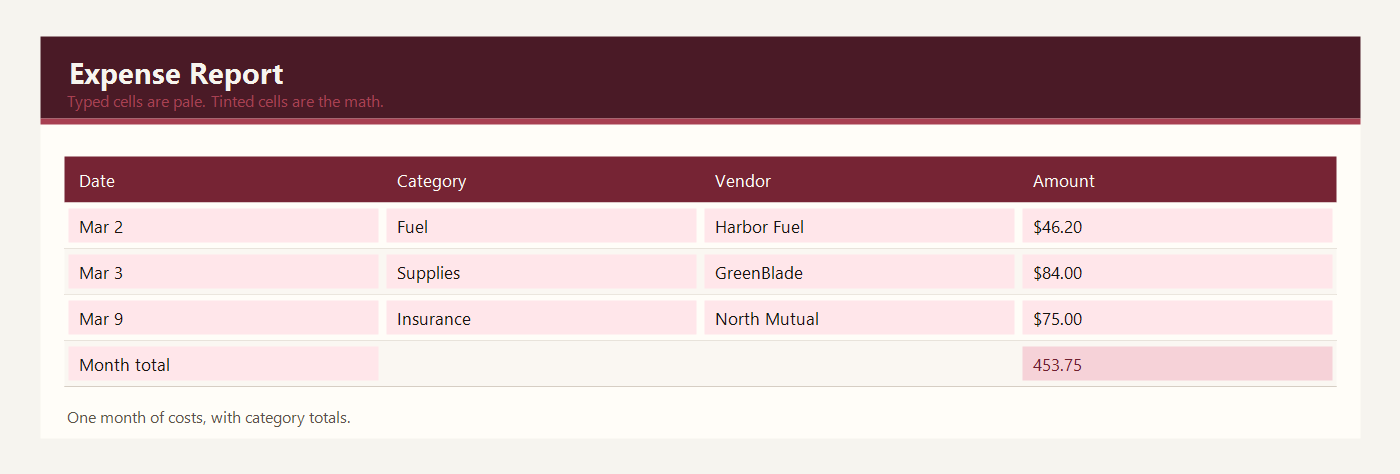
Expense report template free Excel download
The expense report template Excel free download is one workbook named expense-report-template-excel.xlsx. Download the free Excel expense report template. If you searched for an expense report template free Excel file, this is that workbook: pale cells for the rows you type, green cells for the month total and the category totals.
Download Excel. Use that same file as the Google Sheets copy. Do not keep two spreadsheets for the same month.
Microsoft Excel expense report template on Windows and Mac
Open the Microsoft Excel expense report template in Excel for Windows, or as an Excel expense report template Mac file in Excel for Mac. Double-click the .xlsx. Excel for Microsoft 365, Excel 2016 and later, and Excel for iPad open the same sheet. You do not need a separate Mac download. SUM and SUMIF are ordinary Excel formulas, so they work on both operating systems.
Save the file on your computer, then type over the Harbor Lawn sample. If a green total gets overwritten, undo, or download the workbook again. Do not save it as CSV while you still want the math: a CSV keeps the amounts you typed and throws the formulas away.
What to type in each column
Date is the day you spent the money. March 2, 2026 is the first sample row. Use a real date so you can sort the month.
Category is a short name you will reuse: Fuel, Supplies, Tools, Insurance, Phone, or Dump fees in the sample. The category totals look for these exact words. If you rename Fuel to Gas, change the SUMIF word too, or that total stays at zero.
Vendor is who you paid. Harbor Fuel, GreenBlade Shop, North Mutual, City Mobile, and City Yard are the sample vendors. The name helps you find the receipt later.
Amount is the money you spent, in dollars, or your own currency. Type the number you paid, not a budget. A refund can be a negative number if you want the month total to fall.
Receipt is Yes or No. It does not change the math. It tells you which row still needs a piece of paper. The March 15 supplies row is the sample with No.
Note is a few words: mower trailer, replacement blade, yard waste. Notes are for you, not for the total.
Month total is green. It adds every amount. Each category total is green and uses SUMIF. Fuel in the sample is the three Harbor Fuel rows added together.
Example: one month of expenses
Harbor Lawn recorded ten costs in March. One receipt is still missing. The month total is a formula.
| Date | Category | Vendor | Amount | Receipt |
|---|---|---|---|---|
| 2026-03-02 | Fuel | Harbor Fuel | $46.20 | Yes |
| 2026-03-03 | Supplies | GreenBlade Shop | $84.00 | Yes |
| 2026-03-05 | Tools | GreenBlade Shop | $62.50 | Yes |
| 2026-03-07 | Fuel | Harbor Fuel | $41.10 | Yes |
| 2026-03-09 | Insurance | North Mutual | $75.00 | Yes |
| 2026-03-12 | Phone | City Mobile | $32.00 | Yes |
| 2026-03-15 | Supplies | GreenBlade Shop | $28.40 | No |
| 2026-03-18 | Fuel | Harbor Fuel | $39.80 | Yes |
| 2026-03-22 | Dump fees | City Yard | $25.00 | Yes |
| 2026-03-28 | Supplies | GreenBlade Shop | $19.75 | Yes |
The month total is $453.75. Category totals are:
- Fuel: $127.10
- Supplies: $132.15
- Tools: $62.50
- Insurance: $75.00
- Phone: $32.00
- Dump fees: $25.00
Fuel is $46.20 + $41.10 + $39.80 = $127.10. Supplies is $84.00 + $28.40 + $19.75 = $132.15. Those two categories, plus tools, insurance, the phone, and the dump fee, add back to the month total. 1 row is marked No for the receipt: the $28.40 at GreenBlade Shop on March 15. The amount still counts. The No only means the paper is missing.
When the month is closed, copy the category totals onto the profit and loss template. This Excel expense report is the list. The P&L is the month snapshot.
Excel expense report in Google Sheets
For Google Sheets, upload expense-report-template-excel.xlsx to Google Drive, right-click it, and choose Open with Google Sheets. Drive may offer to convert it. Conversion is fine. You do not download a second expense report. SUM and SUMIF survive the upload, which is the whole sheet.
If two people need the log, share that Sheets file. Do not each keep a private Excel copy, or you will have two month totals. Type only in the pale cells. Follow-up files for receipts can sit in a Drive folder; put the filename in the note column.
Common expense report mistakes
- Spelling Supplies as Supply on one row and losing it from the category total.
- Skipping a cash purchase because there was no card receipt. Type the amount and mark Receipt as No.
- Putting client payments in this log. This sheet is money out.
- Typing the month total by hand after adding a row below the SUM range.
- Assuming a category total is tax advice about what you can deduct.
- Saving the workbook as CSV and wondering why the totals stopped moving.
When the goods you buy become a cost, record them here. Send the order on the free purchase order template first if the supplier still needs a quantity and a price. The month snapshot lives on the profit and loss template. Stock that is still on the shelf belongs on the inventory template, not in this log. All three sit with the other bookkeeping templates.
Workbooks for a small shop, a freelancer, or a contractor. Sample amounts are in dollars.