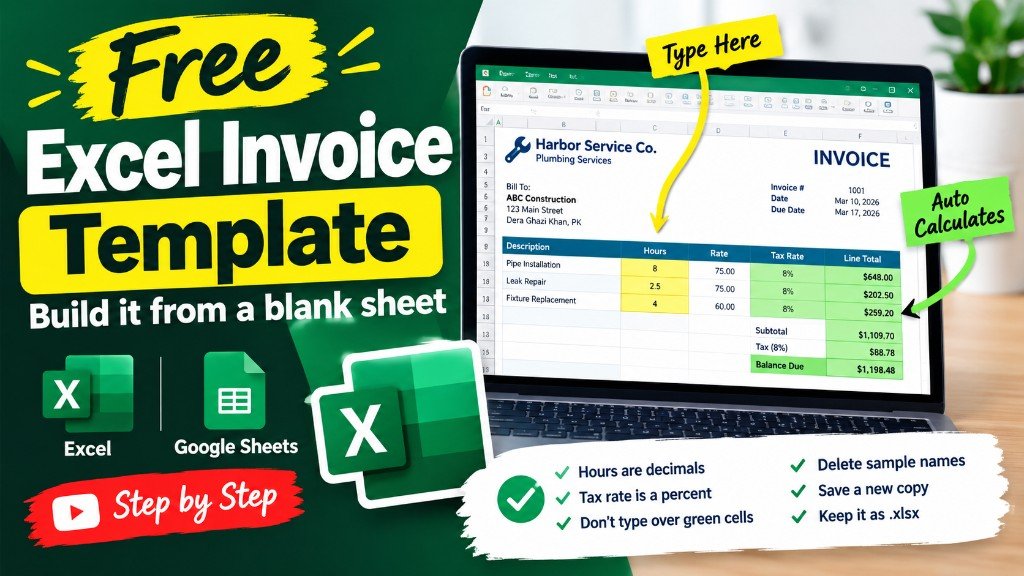
A free invoice template for Excel and Google Sheets is the bill you send after the work. Harbor Service Co., a one-person plumbing business, sent four invoices in the first week of March 2026. Each row is one bill. The tax rate on every sample row is 8 percent. You type the pale cells. Green cells do the math.
The first sheet is the bill you send. Invoice sits in the middle of the top row, with a logo space, the company, and the customer. All four sample bills are on the Sample bills sheet.
Learn the four sample bills the easy way. Harbor Service Co. sent four invoices in one week. The lesson shows hours, tax, and the balance filling in, so you know exactly what to type.
Keep the same file for Excel and for Google Sheets. Upload the .xlsx to Drive when you want Sheets. There is no second download and no email form.
Free invoice template Excel Google Sheets
The free invoice template Excel Google Sheets file asks for an invoice number, a date, a client, the work, the hours, the rate, the tax rate, and the amount already paid. INV-1041 is only a sample number. Use a number you will not repeat.
INV-1041 is a kitchen shutoff valve at Harbor Street Apartments: 2.5 hours at $95. The sheet gets $237.50 before tax, adds $19.00 tax, and shows a line total of $256.50. That bill was paid, so the balance is $0.00. INV-1042 for Lena Ortiz is 1.5 hours at $95. Nothing was paid, so the balance stays $153.90.
What you type, and what you leave
Hours, rate, tax rate, and amount paid are yours. Tax, line total, and balance are formulas. INV-1043 at Northside Cafe was three hours at $95, tax $22.80, line total $307.80, with $100.00 paid and $207.80 still open. INV-1044 was after-hours at $110, four hours, paid in full.
A free quote template is the price you send before the client says yes. Do not use the invoice rows for that conversation. A free purchase order template is the order you send a supplier, not a bill to a customer.