Workbook
Free Quote Template for Excel and Google Sheets
Send this quote template excel while the client is still deciding. Client, job, quantities, prices. Lines multiply, tax uses the rate you typed, and the estimate total sits at the bottom. It is a price, not the final bill.
Dana Brooks asked for a repaint on a two-bedroom. The sample holds until April 15, 2026. After that date, change the prices before you promise the old total. Labor and materials are split so a change in gallons does not hide inside an hourly rate.
Download the quote template
Download the Excel file. If you work in Google Sheets, upload that same workbook to Drive and open it there. Leave the green cells alone.
I leave the sample rows in until I have typed one real line next to them. That way I can see whether my hours or prices sit in the same neighborhood as the example. Then I delete the leftover names. If you share the file, strip the sample clients first.
After you wipe the sample, save a clean copy under a name that includes the month or the client. I have lost a week of hours by typing over last week’s file. The formulas do not care about the file name. You will.
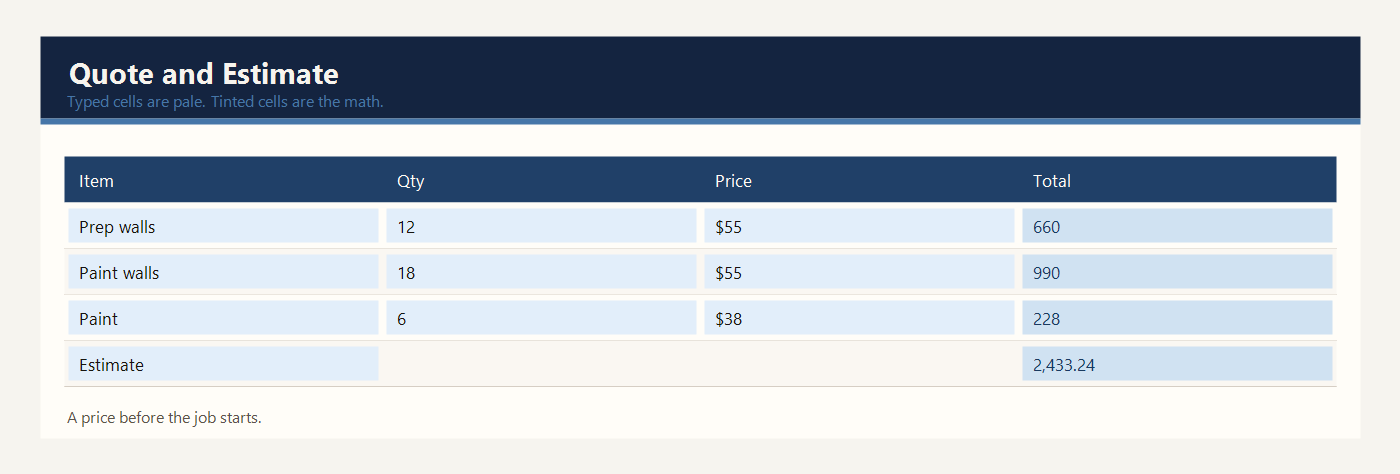
What to type in each column
Client is the person who will accept or reject the price. Dana Brooks is the sample. One quote, one client.
Job is a short name for the work. Repaint a two-bedroom apartment tells the client what the numbers belong to.
Valid until is the last day this price holds. After April 15, 2026 in the sample, the contractor can change the price. The sheet does not expire itself. The date is a promise you can point to.
Tax rate is a percent. The sample is 8%. Type 8% in the yellow cell, not the number 8. The tax formula multiplies the subtotal by this rate.
Item is one part of the job. Prep and patch walls is separate from paint, and paint as a material is separate from paint the walls as labor. Splitting labor and materials keeps the estimate easy to explain.
Qty is hours, gallons, or a count of sets. Twelve hours of prep and six gallons of paint are both quantities. Say the unit in the item name so 12 is not a mystery.
Unit price is the price for one of those units, in dollars, or your own currency. Labor in the sample is $55 an hour. Paint is $38 a gallon.
Line total is green. It is quantity times unit price. Subtotal adds the lines. Tax is green and uses the tax rate. Estimate total is subtotal plus tax. In the sample those last three numbers are $2,253.00, $180.24, and $2,433.24.
Example: a contractor estimate
Dana Brooks asked for a price before anyone opened a paint can. Five lines cover labor, paint, and protection for the floors.
| Item | Qty | Unit price | Line total |
|---|---|---|---|
| Prep and patch walls | 12 | $55.00 | $660.00 |
| Paint the walls | 18 | $55.00 | $990.00 |
| Paint | 6 | $38.00 | $228.00 |
| Trim and doors | 6 | $55.00 | $330.00 |
| Drop cloths and tape | 1 | $45.00 | $45.00 |
Prep is 12 hours at $55, which is $660. Painting the walls is 18 hours at $55, which is $990. Paint is 6 gallons at $38, which is $228. Trim and doors are 6 hours at $55, which is $330. Drop cloths and tape are one set at $45. The subtotal is $2,253.00. Tax at 8 percent is $180.24. The estimate total is $2,433.24.
If the apartment needs two extra gallons, change the yellow quantity from 6 to 8. The paint line becomes $304, the subtotal rises by $76, and the tax and total both move. The valid-until date stays April 15 unless you change that cell too.
Put the valid-until date in the message you send with the file, not only inside the sheet. A client who accepts on April 20 is accepting after the sample date of April 15. You can still do the work, but you should change the date and recheck the prices first.
Labor and materials are split so a change in gallons does not hide inside an hourly rate. If the client asks to drop a room, reduce the yellow quantities and send the new green total. Do not offer a verbal discount that is not in the file. Read the estimate total from the green cell after every change, including a change to the tax rate.
Excel and Google Sheets
Download quote-template-excel.xlsx and open it in Excel, or drop that same file into Google Drive and open it with Google Sheets. I do not keep a second copy for Sheets. One workbook is enough.
Line totals multiply quantity by unit price. Tax multiplies the subtotal by the tax-rate cell. The file is quote-template-excel.xlsx. Google Sheets keeps those formulas when you upload the file. Send the client the totals. Keep the yellow cells in your copy so you can revise the price.
The math uses IF, ROUND, SUM, SUMIF, and COUNTIF. Leave the file as xlsx. A CSV export keeps the numbers and throws the formulas away. Input cells are yellow. Results are green. Type over a green cell and the formula is gone — Undo, or grab the file again.
The sample money is in dollars. If you work in another currency, change the note at the top of the sheet. Adding 2.5 × 95 does not care what you call the unit.
Common quote mistakes
- Typing 8 instead of 8% and creating a tax larger than the job.
- Hiding material inside a labor line so the client cannot see the gallons.
- Reusing the quote as a final bill without checking what was actually used.
- Letting the valid-until date pass and still promising the old total.
- Typing over the green estimate total when the client asks for a discount. Change a yellow price instead, so the tax still matches.
Related templates
If the job in front of you is a little different, these two are usually the next stop.
Workbooks for a small shop, a freelancer, or a contractor. Sample amounts are in dollars.