Workbook
Free Balance Sheet Template for Excel
A balance sheet template excel is a snapshot, not a month of sales. What the shop owns, what it owes, and what is left for the owner, all on one date. You type the amounts. The sheet adds each group and checks that assets equal liabilities plus equity.
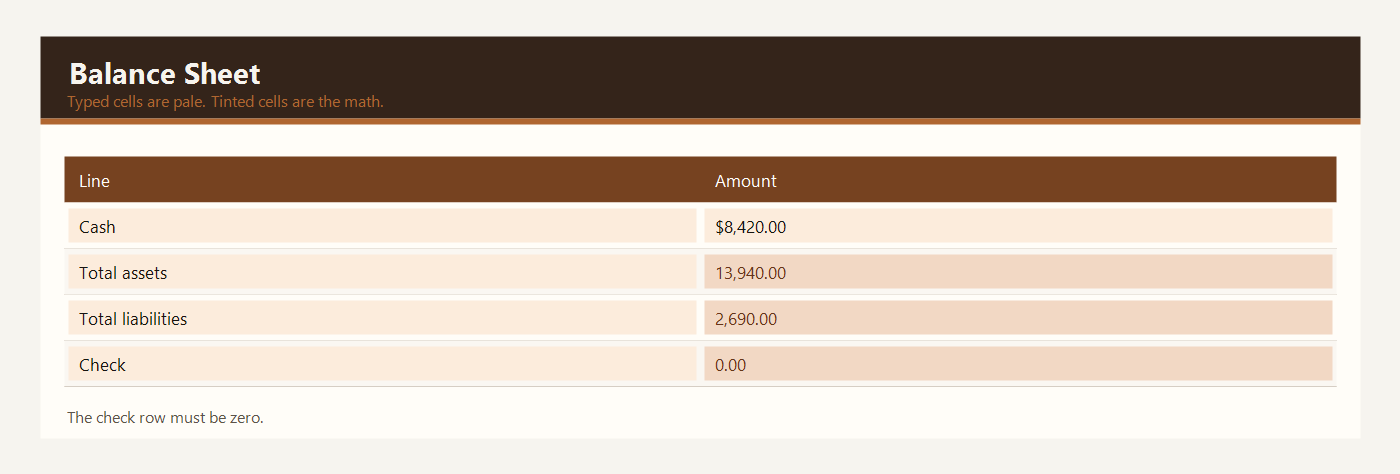
Harbor Goods, March 31, 2026, one owner. The check row should read zero. If it does not, a number is sitting in the wrong pile. Profit for the month lives on the other statement.
Download the balance sheet template
Download the Excel file. If you work in Google Sheets, upload that same workbook to Drive and open it there. Leave the green cells alone.
I leave the sample rows in until I have typed one real line next to them. That way I can see whether my hours or prices sit in the same neighborhood as the example. Then I delete the leftover names. If you share the file, strip the sample clients first.
After you wipe the sample, save a clean copy under a name that includes the month or the client. I have lost a week of hours by typing over last week’s file. The formulas do not care about the file name. You will.
What to type in each column
The two columns are Line and Amount. Line names the item. Amount is the number on the snapshot date.
Assets are what the shop owns. Cash in the bank is the checking balance. Accounts receivable is money customers still owe you. Inventory at cost is the stock you counted, priced at what you paid, not at the shelf tag. Equipment is tools and fixtures you still use. Type each one in a yellow cell.
Total assets is green. It adds the asset rows. In the sample that is cash, receivables, inventory, and equipment.
Liabilities are what the shop owes. Supplier bills are unpaid invoices from people you buy from. Sales tax collected is money sitting in the bank that belongs to the tax authority, not to you. A short-term loan is money you must pay back. Type the balances, not the original loan amount, if you have already paid part of it.
Total liabilities is green. It adds those debts.
Equity is the owner’s side. Owner investment is money the owner put in. Retained earnings is profit left in the business from earlier periods. Type the numbers your books already support. This sheet does not invent retained earnings from the profit and loss page. You bring that number across yourself.
Total equity is green. The check row is green. It is total assets minus total liabilities minus total equity. A finished snapshot shows 0. If the check is not zero, a number is missing or one amount was typed in the wrong group.
Example: a one-owner shop
Harbor Goods closed March 31 with a simple set of balances. One owner. No outside investors. Dollars, or your own currency if you relabel the header.
| Line | Amount |
|---|---|
| Cash in the bank | $8,420.00 |
| Accounts receivable | $1,260.00 |
| Inventory at cost | $1,860.00 |
| Equipment | $2,400.00 |
| Total assets | $13,940.00 |
| Supplier bills | $980.00 |
| Sales tax collected | $210.00 |
| Short-term loan | $1,500.00 |
| Total liabilities | $2,690.00 |
| Owner investment | $8,000.00 |
| Retained earnings | $3,250.00 |
| Total equity | $11,250.00 |
| Check | $0.00 |
Assets are $8,420 + $1,260 + $1,860 + $2,400 = $13,940.00. Liabilities are $980 + $210 + $1,500 = $2,690.00. Equity is $8,000 + $3,250 = $11,250.00. Liabilities plus equity are $13,940.00, the same as the assets. The check is $13,940.00 minus that sum, which is $0.00.
The sales-tax line is easy to misread. The $210 is in the bank, so it is tempting to call it cash and also forget the debt. The sample lists the cash as one asset and the tax as a liability. Counting the $210 only as cash, with no liability, would make the check miss by $210. The check exists to catch that.
Take the numbers from the same day. Cash on March 31 and a loan balance from March 10 will not check to zero for a reason that has nothing to do with the formula. Print or save the bank page and the loan page on the snapshot date, then type. If the check is off by a round number such as 100, look for a transposed digit before you add a new line.
Equipment is the cost you still carry, not the price you would get if you sold the tools tomorrow. This sheet is not an appraisal.
Excel and Google Sheets
Download balance-sheet-template-excel.xlsx and open it in Excel, or drop that same file into Google Drive and open it with Google Sheets. I do not keep a second copy for Sheets. One workbook is enough.
The check formula is total assets minus the sum of total liabilities and total equity. The file is balance-sheet-template-excel.xlsx. Open it in Google Sheets the same way as the other workbooks on this site. A check of zero means the three groups agree. It does not mean the business is healthy.
The math uses IF, ROUND, SUM, SUMIF, and COUNTIF. Leave the file as xlsx. A CSV export keeps the numbers and throws the formulas away. Input cells are yellow. Results are green. Type over a green cell and the formula is gone — Undo, or grab the file again.
The sample money is in dollars. If you work in another currency, change the note at the top of the sheet. Adding 2.5 × 95 does not care what you call the unit.
Common balance sheet mistakes
- Pricing inventory at the retail tag instead of cost, which inflates assets.
- Leaving sales tax inside cash and also leaving it out of liabilities.
- Typing the original loan instead of the amount still owed.
- Forcing the check to zero by typing over the green check cell.
- Treating this snapshot as tax advice or as a full set of books.
Related templates
If the job in front of you is a little different, these two are usually the next stop.
Workbooks for a small shop, a freelancer, or a contractor. Sample amounts are in dollars.