Workbook
Free Excel Timesheet Template
The excel timesheet template I keep is boring on purpose. Date, start, end, break in minutes. Hours come out of those four cells, then the week adds itself. Pay is a different file. Get the hours right first.
Maya Chen’s sample week starts March 2, 2026. Days only — the formula does not like a shift that crosses midnight. Read each day before you trust the week. A cell that shows more than 12 hours is usually a clock typed wrong. If you need money after this, open the payroll sheet with the green total in hand.
Download the timesheet template
Download the Excel file. If you work in Google Sheets, upload that same workbook to Drive and open it there. Leave the green cells alone.
I leave the sample rows in until I have typed one real line next to them. That way I can see whether my hours or prices sit in the same neighborhood as the example. Then I delete the leftover names. If you share the file, strip the sample clients first.
After you wipe the sample, save a clean copy under a name that includes the month or the client. I have lost a week of hours by typing over last week’s file. The formulas do not care about the file name. You will.
What to type in each column
Employee is the person this week belongs to. The sample says Maya Chen. If you track a second person, copy the file rather than stacking two people in one week block. One sheet, one person, one week keeps the total honest.
Week of is the Monday, or whatever day you start the week. The sample week starts March 2, 2026. The date column then lists each workday.
Date is the workday. Use a real date. The sample runs Monday through Friday and skips the weekend because Maya did not work those days. Add a row if your week has a Saturday.
Start is the time work began. Type it as a time, such as 8:00. Do not type 8 and hope the sheet knows you mean morning. 8:00 in the sample is the start of the Monday shift.
End is the time work stopped on the same day. 16:30 means 4:30 in the afternoon. This sheet does not handle a shift that crosses midnight. If someone works past midnight, split the shift or keep a note outside the formula.
Break minutes is unpaid break time, typed as minutes. Thirty minutes is 30, not 0.5. This column is the opposite of the hours column. The sheet converts minutes to hours for you by dividing by 60.
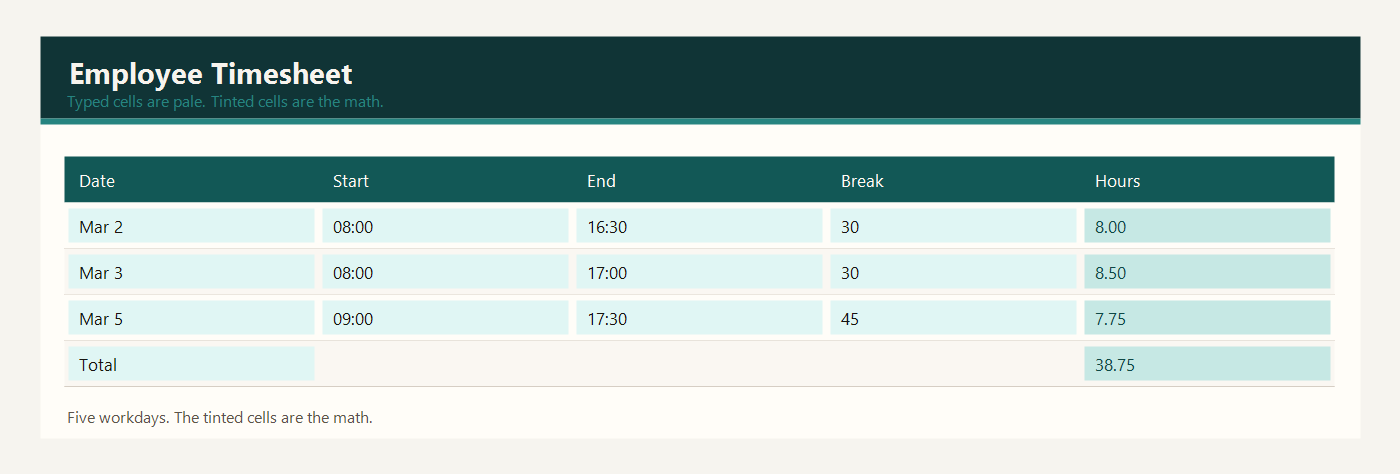
Hours is green. The sheet subtracts the start from the end, turns the result into hours, then subtracts the break. Monday is 8:00 to 16:30 with a 30 minute break, which is 8.00 hours. Thursday is 9:00 to 17:30 with a 45 minute break, which is 7.75 hours.
Total hours is green. It adds the daily hours. You read this number when you move the week into payroll. Do not retype it there until you trust it.
Example: one employee, five workdays
Maya Chen worked five days. Each day has a start, an end, and a break. The sheet did the subtraction.
| Date | Start | End | Break minutes | Hours |
|---|---|---|---|---|
| 2026-03-02 | 08:00 | 16:30 | 30 | 8.00 |
| 2026-03-03 | 08:00 | 17:00 | 30 | 8.50 |
| 2026-03-04 | 08:00 | 16:00 | 30 | 7.50 |
| 2026-03-05 | 09:00 | 17:30 | 45 | 7.75 |
| 2026-03-06 | 08:00 | 15:00 | 0 | 7.00 |
Monday is a straight 8.00 hour day: eight and a half hours on the clock, minus a 30 minute lunch. Tuesday runs until 17:00, so the day is 8.50 hours after the same 30 minute break. Wednesday ends at 16:00, so it is 7.50 hours. Thursday starts later, at 9:00, ends at 17:30, and has a 45 minute break, so the day is 7.75 hours. Friday is 8:00 to 15:00 with no break, which is 7.00 hours.
Add those days: 8.00 + 8.50 + 7.50 + 7.75 + 7.00 = 38.75 hours. That is the weekly total in the green cell. If Maya takes a longer lunch, you change the break minutes and the total falls. You do not edit the 38.75 by hand.
Before you pay from this total, read each day. A day that shows more than 12 hours is usually a clock typed wrong, not a heroic shift. The sample week stays under that line. If your workplace pays overtime after a set number of hours, note that rule outside this file. The total cell only adds the days. It does not know an overtime law.
Excel and Google Sheets
Download excel-timesheet-template.xlsx and open it in Excel, or drop that same file into Google Drive and open it with Google Sheets. I do not keep a second copy for Sheets. One workbook is enough.
The hours formula is end minus start, times 24, minus break minutes divided by 60. Excel stores times as fractions of a day, which is why the 24 is there. Google Sheets uses the same idea, so excel-timesheet-template.xlsx does not need a second formula when you upload it to Drive.
The math uses IF, ROUND, SUM, SUMIF, and COUNTIF. Leave the file as xlsx. A CSV export keeps the numbers and throws the formulas away. Input cells are yellow. Results are green. Type over a green cell and the formula is gone — Undo, or grab the file again.
The sample money is in dollars. If you work in another currency, change the note at the top of the sheet. Adding 2.5 × 95 does not care what you call the unit.
Common timesheet mistakes
- Typing 30 in the hours column. Break minutes are 30. Hours are the green result.
- Typing 4:30 PM as 4.30. Use 16:30, or a real time such as 4:30 PM if your sheet is set to show AM and PM.
- Using one file for two employees and then paying the combined total to one person.
- A shift that ends after midnight. This sample formula assumes the end is later on the same day.
- Rounding each day in your head and also keeping the formula. Trust the total cell.
Related templates
If the job in front of you is a little different, these two are usually the next stop.
Workbooks for a small shop, a freelancer, or a contractor. Sample amounts are in dollars.