Sales template
Free CRM Spreadsheet Template
This free CRM spreadsheet template is one workbook for a small sales list. You can open it in Excel, or upload that same file and use it as a Google Sheets CRM template. There is not a second download, and there is no email form. The column-by-column example, with all fifteen Harbor Service Co. customers, is on the free CRM Excel template. This page is the spreadsheet path: how to open the file in Google Sheets, which cells you fill, and which jobs a sheet should refuse.
A CRM spreadsheet is a contact list with a next date on it. Open that same file when you want a CRM template for Google Sheets. A CRM Google Sheets template, on this site, is not a second workbook and it is not behind an email form. Download once, then open it where you already work.
Google Sheets CRM template free download
The Google Sheets CRM template free download is free-crm-excel-template.xlsx. Download the workbook to your computer first. Then upload it to Google Drive. Right-click the file and choose Open with Google Sheets. Drive may offer to convert it. Conversion is fine. Saving a copy as CSV is not, because a CSV drops the formulas that mark Due and add the open pipeline.
After it opens, type only in the pale cells. Follow-up, open pipeline, open count, won value, and due today are already formulas. Google Sheets supports IF, OR, TODAY, SUMIF, and COUNTIF, which is the whole sheet. If two people need the list, share that Sheets file. Do not each keep a private Excel copy, or you will have two truths about the same customer.
Excel users can ignore Drive. Double-click the file. The columns do not change between the two programs. If a green cell gets overwritten, the math is gone. Undo, or download the file again.
What this CRM spreadsheet tracks
Each row is one customer. You fill customer, company, phone, email, source, last contact, next contact, next step, stage, and deal value. Source is a short label such as Referral, Repeat, Website, Walk-in, or Quote form. Stage is New, Talking, Quote sent, Won, or Lost. The open pipeline adds deal values only where the stage is Talking or Quote sent.
Follow-up is the cell you read, not the cell you type. Closed means the stage is Won or Lost. Set a date means a live lead has no next contact. Due means the next contact is today or earlier. Scheduled means the date is still ahead. Sort by next contact when you decide who to call. Sort by Follow-up when you only want the rows that say Due.
I did not split companies, contacts, and deals onto three tabs. Those tabs look thorough, and then a one-person list falls behind because the same name has to be typed twice. One fillable worksheet is enough until the list is no longer something you can scan on a Monday morning.
A fillable worksheet, read on one date
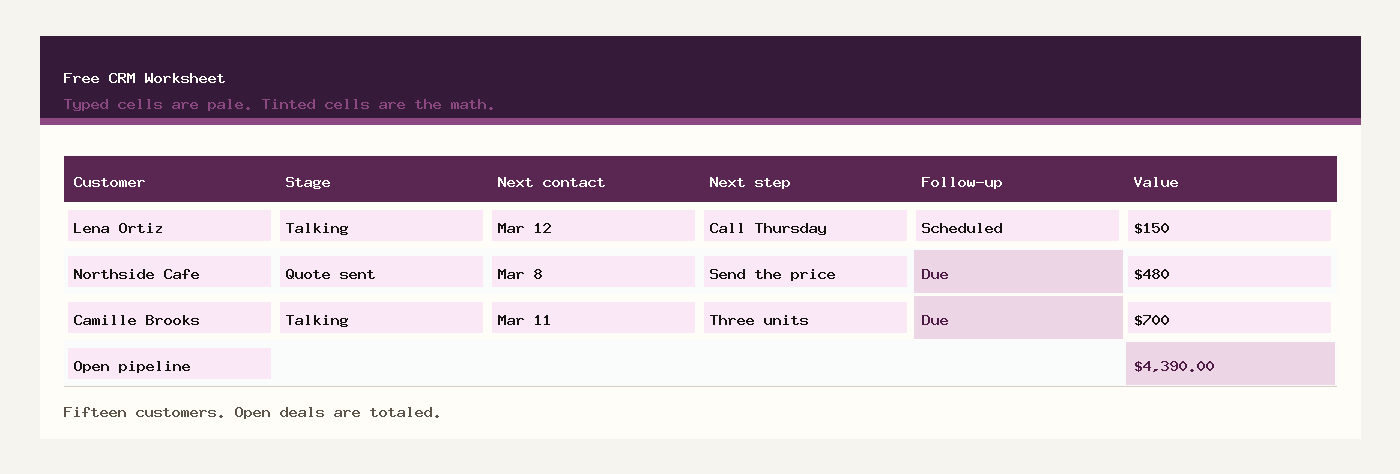
Read the sample as of March 11, 2026. The file itself uses TODAY(), so a later calendar will mark those March dates as Due until you replace them. On March 11 the open pipeline is $4,390.00 across 7 customers, the won value is $911.70, and 3 follow-ups say Due.
Two of those Due rows are still in the pipeline. Northside Cafe is Quote sent at $480, and the price was due March 8. Camille Brooks is Talking at $700, and the next contact is March 11. River Hardware is also Due, but the stage is New and the value is $0, so River is a missed introduction, not open money. That split is the point of keeping stage and follow-up in different columns.
The other open rows are Scheduled on March 11: Lena Ortiz on March 12, Peak Fitness on March 13, Oak Lane Clinic on March 14, Blue Kettle Bakery on March 16, and Little Elm PTA on March 18. Call the Due rows before you polish a quote that is not due yet.
What the spreadsheet will not do
This sheet will not email a reminder, record that you opened a message, or build a dashboard of lead sources. A hosted CRM is the tool that does those jobs, and it is a fair next step when more than one person is updating the same fifty relationships every day. Until then, the failure mode of a spreadsheet is usually a blank next contact, not a missing chart.
It also will not price the job. When the next step says Send the price, move to the quote template, then come back and set the stage to Quote sent with the estimate in deal value. The pipeline number should match a quote you could actually send.
It will not tell you that the open pipeline is collectible. Won value is work you already closed. Open pipeline is work you have not closed. Keep those totals apart, which the sheet already does if the stage words stay exact.
Related templates
Workbooks for a small shop, a freelancer, or a contractor. Sample amounts are in dollars.